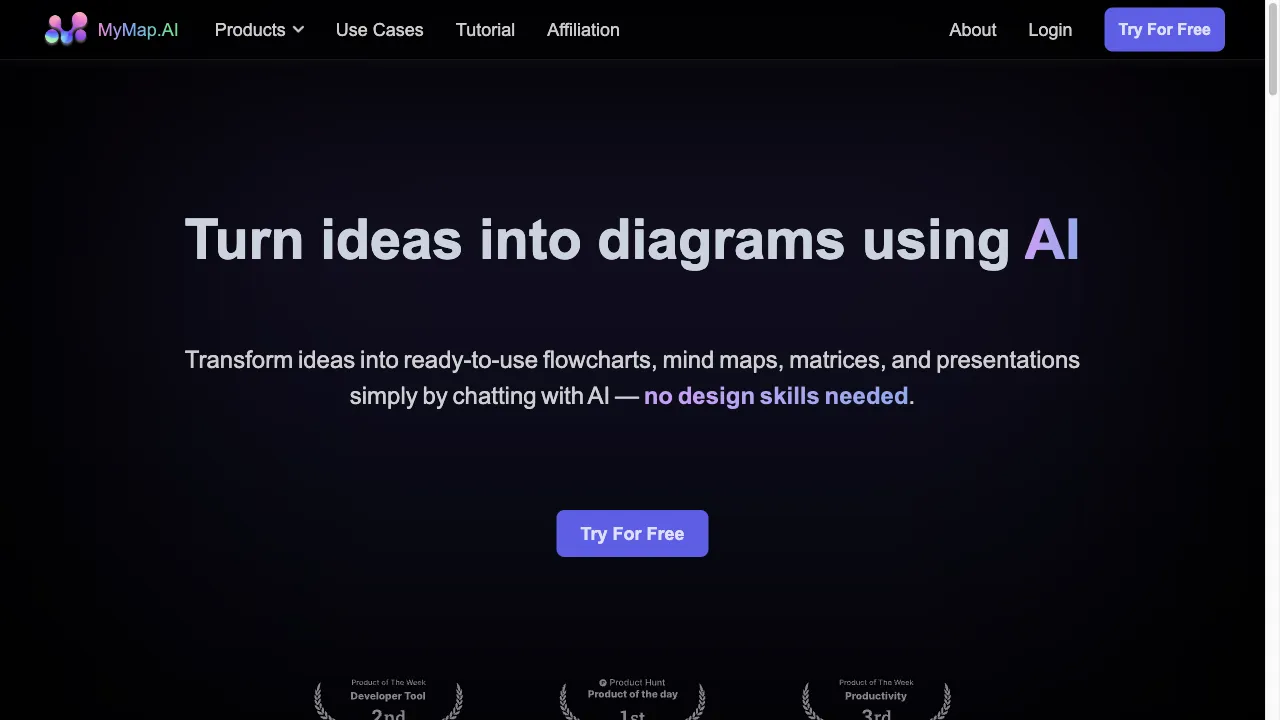
क्या है MyMap.AI?
MyMap.AI is an advanced platform that utilizes artificial intelligence to help users create diagrams and presentations effortlessly. The tool offers features like mind mapping, PDF summarization, AI-generated presentations, and comparison chart creation, making it accessible for various users, including students and professionals. With a user-friendly interface and support for multiple languages, MyMap.AI enhances productivity and creativity, allowing users to visualize complex ideas easily.
MyMap.AI ट्रैफिक एनालिटिक्स
MyMap.AI मासिक विजिट
MyMap.AI शीर्ष विजिट किए गए देश
MyMap.AI शीर्ष कीवर्ड्स
MyMap.AI वेबसाइट ट्रैफिक स्रोत
MyMap.AI विशेषताएँ
Mind Mapping
MyMap.AI simplifies mind mapping, allowing users to brainstorm ideas effortlessly. The AI interprets user inputs and generates structured mind maps, making it easier to visualize thoughts and concepts.
PDF Summarization
This feature condenses lengthy PDFs into key points, enabling users to quickly understand essential information without reading through extensive documents.
AI Presentation Generation
Users can create professional presentations in minutes. The AI ensures that slides are visually engaging and informative, streamlining the presentation-making process.
Comparison Chart Maker
This tool allows users to create clear comparison charts to analyze different datasets visually, aiding in decision-making and presentations.
Collaboration Tools
MyMap.AI facilitates real-time collaboration, enabling multiple users to work on the same project simultaneously, enhancing teamwork and productivity.
MyMap.AI फायदे
Time Efficiency
MyMap.AI significantly reduces the time required to create diagrams and presentations, allowing users to focus on content rather than design.
User-Friendly Interface
The platform is designed to be intuitive, requiring no design skills from the user, making it accessible for everyone.
Versatile Formats
Supports a wide range of input formats and outputs, enhancing flexibility and usability across different projects.
Real-Time Collaboration
Enhances team productivity with real-time collaboration features, allowing multiple users to work together seamlessly.
MyMap.AI नुकसान
Initial Learning Curve
Some users may require time to get accustomed to the chat-based interface, which can be different from traditional tools.
Limited Offline Capabilities
The platform requires internet access for full functionality, which may be a limitation for some users.
Customization Limits
Some users might find the customization options limited compared to traditional diagram tools, which offer more extensive features.
उपयोग कैसे करें MyMap.AI
Step 1: Getting Started
To begin using MyMap.AI, users need to create an account on the platform. The intuitive chat-based interface allows users to input their ideas, and the AI transforms these into visual formats without requiring design expertise.
Step 2: Creating Diagrams
Users can create diagrams by simply chatting with the AI. The platform supports multiple format uploads, allowing users to enter topics or upload files, and the AI generates diagrams using the context provided.
Step 3: Collaboration
MyMap.AI's collaboration tools enable users to invite others to join their projects, fostering communication and ensuring everyone is on the same page. This functionality is particularly beneficial for team projects and collaborative work environments.
कौन उपयोग कर रहा है MyMap.AI
Academic and Educational Use
Students and educators can utilize MyMap.AI to turn lecture notes and research papers into visual mind maps and flowcharts. This aids in better understanding and retention of information.
Business and Professional Use
Professionals can employ MyMap.AI to create visual project maps, process flowcharts, and business presentations. The tool is particularly beneficial for strategic planning and business proposals.
Content Creation
Content creators can use MyMap.AI to generate visual outlines, storyboards, and content calendars. The tool's ability to integrate live web search results and pull relevant information from URLs enhances the richness of the content created.
टिप्पणियाँ
"MyMap.AI has transformed the way I create presentations. The AI features are incredibly helpful and save me a lot of time!"
"As a student, I find MyMap.AI very useful for visualizing complex topics. It has made studying much easier for me!"
"I love how collaborative MyMap.AI is. It allows my team to work together seamlessly, which is essential for our projects."
संदर्भ
- [3] Medium - MyMap AI Reviews.URL:https://medium.com/@gianrooster/mymap-ai-reviews-the-easiest-way-to-create-diagrams-0ca33aed9f47
- [4] Medium - MyMap AI Review.URL:https://medium.com/@the_airtist/mymap-ai-review-your-guide-to-ai-insights-b5df38cfbe68
MyMap.AI विकल्प

AI-powered note-taking application for efficient organization.

एक ऑटोमेशन प्लेटफ़ॉर्म जो अनुप्रयोगों को जोड़ता है।

एक क्लाउड-आधारित ग्राफिक डिज़ाइन सॉफ़्टवेयर जो दृश्य सामग्री बनाने के लिए है।

एक अभिनव AI-संचालित सामग्री निर्माण प्लेटफ़ॉर्म।

An AI-powered document management tool for efficient analysis.

एक डिजिटल नोट-लेने वाला एप्लिकेशन सहज संगठन के लिए।

एक AI-संचालित लेखन सहायक जो कुशल दस्तावेज निर्माण के लिए है।

एक क्लाउड-आधारित माइंड मैपिंग उपकरण जो सहयोग को बढ़ाता है।

AI उपकरणों और सेवाओं के लिए एक व्यापक निर्देशिका।

एक बहुपरकार का आरेखण उपकरण पेशेवरों के लिए।
AI के प्रभाव और शासन का अन्वेषण करने वाला प्लेटफ़ॉर्म।

एक अभिनव मानचित्रण प्लेटफ़ॉर्म जो उपयोगकर्ताओं के लिए विश्व स्तर पर उपलब्ध है।

AI-driven tool for creating mind maps from diverse content.

कनारीज एक AI-शक्ति वाला डेटा विश्लेषण प्लेटफॉर्म है।

एक उन्नत AI प्लेटफार्म जो सहज एकीकरण और प्रबंधन के लिए है।

एक अभिनव प्लेटफार्म तकनीकी दस्तावेज़ के लिए।