What is Polycam?
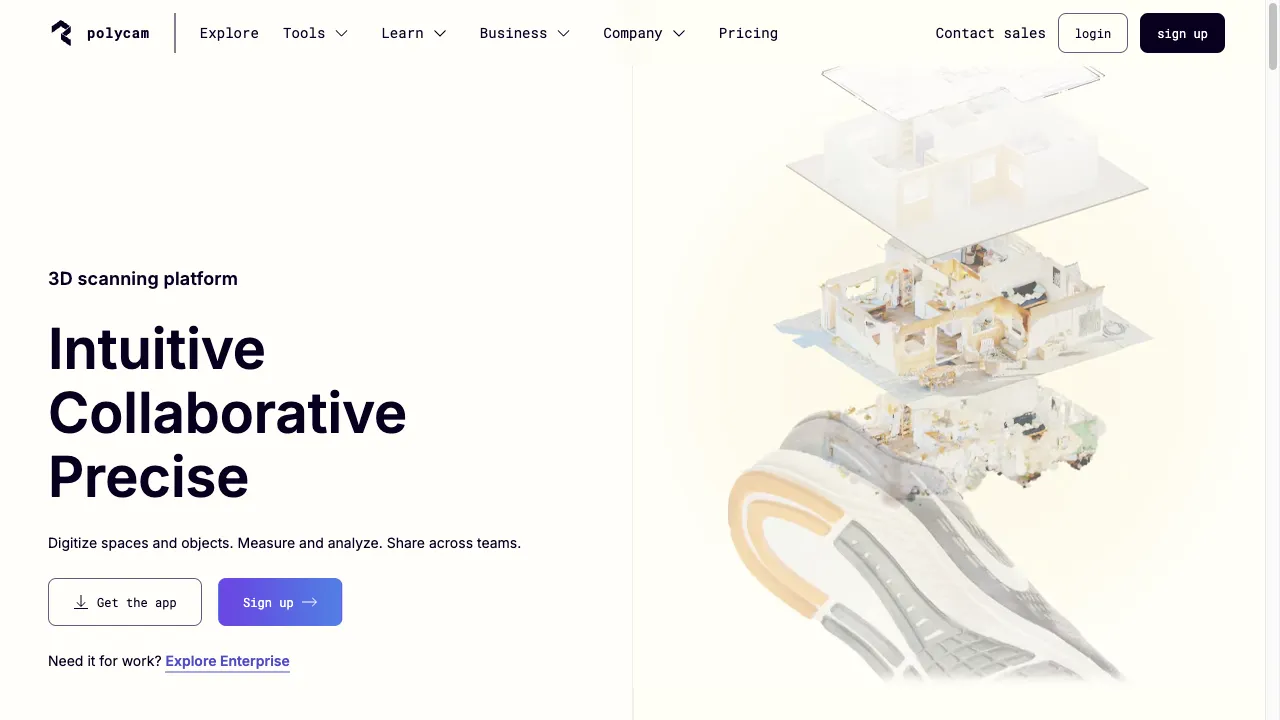
Polycam is a leading application in 3D scanning, utilizing LiDAR and photogrammetry to create high-quality 3D models. Ideal for VFX artists, game developers, and architects, it enables users to capture real-world objects and environments with precision. The app's mobile accessibility enhances flexibility, allowing users to scan and edit on the go. Polycam supports seamless integration with popular 3D software, making it a crucial tool for professionals in the digital media landscape.
Polycam Traffic Analytics
Polycam Monthly Visits
Polycam Top Visited Countries
Polycam Top Keywords
Polycam Website Traffic Sources
Polycam Features
3D Scanning
Polycam enables users to scan environments and objects using LiDAR technology, which captures depth information, resulting in accurate and detailed 3D models.
Photogrammetry Support
The app supports photogrammetry, allowing users to create 3D models from photographs, which is essential for capturing intricate details.
Software Integration
Polycam offers support for a wide range of export formats, ensuring seamless integration with popular 3D software like Blender, Maya, and Unity.
Real-Time Editing
Users can edit and refine their scans in real-time, adjusting parameters to achieve the desired level of detail and accuracy.
Collaboration Tools
Polycam enhances teamwork by facilitating sharing and collaboration among project members, improving the workflow on complex projects.
User-Friendly Interface
The application is designed for ease of use, making it accessible for beginners while still offering advanced features for experienced users.
Polycam Pros
High-Quality Scans
Polycam produces detailed and accurate 3D models, making it suitable for professional use in VFX and game development. The high fidelity of the scans ensures that artists can create realistic assets that enhance the overall quality of their projects.
Versatile Functionality
The combination of LiDAR scanning and photogrammetry provides users with multiple ways to capture 3D data, allowing for flexibility in various project scenarios. This versatility is essential for artists working on diverse applications, from film production to architectural visualization.
Mobile Convenience
The ability to scan and edit on mobile devices enhances flexibility and accessibility for users. This convenience is particularly beneficial for professionals who need to capture 3D data while on the move, enabling them to work efficiently in various environments.
Seamless Integration
Polycam's support for various export formats allows for easy integration with popular 3D software, streamlining the workflow for artists. This feature is crucial for professionals who want to incorporate their scanned assets into existing projects without hassle.
User-Friendly Interface
The intuitive design of the app makes it accessible for users of all skill levels. Beginners can quickly learn to navigate the app, while experienced users can utilize its advanced features without difficulty.
Polycam Cons
Device Limitations
Polycam requires devices with LiDAR sensors, which may limit accessibility for some users. This dependency on specific hardware can pose challenges for those without compatible devices.
Learning Curve
While the app is user-friendly, new users may still face a learning curve when navigating advanced features. This can lead to initial challenges in fully utilizing the app's capabilities.
Dependence on Mobile Hardware
The quality of scans can vary depending on the capabilities of the user's device, which may affect the overall output. Users with less powerful devices may not achieve the same level of detail as those with high-end models.
Subscription Costs
Some advanced features may require a subscription, which could be a consideration for budget-conscious users. This cost factor may deter some potential users from fully exploring the app's capabilities.
How to Use Polycam
Step 1: Download and Install
To get started with Polycam, users need to download the app from the App Store or Google Play. Ensure that the device is equipped with a LiDAR sensor for optimal performance.
Step 2: Create an Account
After installing the app, users must create an account to access all features and functionalities. This process is straightforward and allows for a personalized experience.
Step 3: Scanning Process
Begin scanning by selecting the desired scan mode, either LiDAR or photogrammetry. Follow the on-screen instructions to capture the object or environment, ensuring to move around it for comprehensive coverage.
Step 4: Editing Scans
Once the scan is complete, users can edit the model in real-time. Adjust various parameters to enhance the quality and detail of the 3D representation, ensuring it meets the project requirements.
Step 5: Exporting and Sharing
After finalizing the model, users can export it in various formats compatible with their preferred 3D software. Additionally, users can share their scans with collaborators or clients directly through the app.
Who is Using Polycam
VFX and Film Production
In the VFX and film industry, Polycam allows artists to create realistic 3D assets that significantly enhance the visual quality of their projects. The ability to capture detailed environments and objects ensures that productions achieve a high level of realism.
Game Development
Game developers utilize Polycam to produce lifelike characters and environments, contributing to a more immersive gaming experience. The detailed models created with Polycam help improve the overall gameplay and visual appeal.
Architectural Visualization
Architects can leverage Polycam for accurate architectural visualization, allowing them to present their designs effectively. Scanning real-world locations enables the creation of precise models for client presentations and design processes.
Cultural Heritage Preservation
Polycam plays a role in the digital preservation of historical sites and artifacts, allowing for their study and appreciation without physical interaction. This capability is crucial for researchers and educators in the field.
Virtual and Augmented Reality
The application supports the creation of assets for virtual reality (VR) and augmented reality (AR) experiences, making it a valuable tool for developers in these emerging fields. The realistic models enhance user engagement and immersion.
Comments
"Polycam has completely transformed how I approach 3D modeling. The detail and accuracy are unmatched!"
"As a game developer, I find Polycam to be an invaluable tool. It saves me so much time in asset creation."
"The ability to scan on my mobile device is a game changer. I can work from anywhere!"
"Polycam is user-friendly and intuitive. I was able to start creating models within minutes of downloading it."
"The integration with Unity is seamless, making it easy to implement my scanned assets into my projects."
References
- [4] Techniques to improve SEO for a static website or blog.URL:https://cri.dev/posts/2020-07-18-Techniques-to-optimize-SEO-for-a-static-website-or-blog/
Polycam Alternatives

AI-powered app, AI-powered app, AI-powered app! It helps you with your clothes. AI-powered app makes your wardrobe fun. ...
AI-based online photo editor with versatile tools.

A cloud-based platform for computer vision development.

AI-powered image and video editing platform.

An advanced AI platform for creating and enhancing visual content.

Online AI tool for high-quality image upscaling.

Leading motion capture technology for animation and gaming.

AI-powered photo and video editing service for professionals.

AI-powered tool for seamless digital content creation.

AI-powered tool for generating 3D models from text and images.

Advanced AI tool for geolocating images with high accuracy.

An advanced AI photo editing app for mobile users.

AI art generator for creative image generation.

Revolutionizing the job application process with AI tools.

Privacy-focused open-source Network Video Recorder with AI capabilities.

Innovative productivity and utility apps for enhanced daily efficiency.