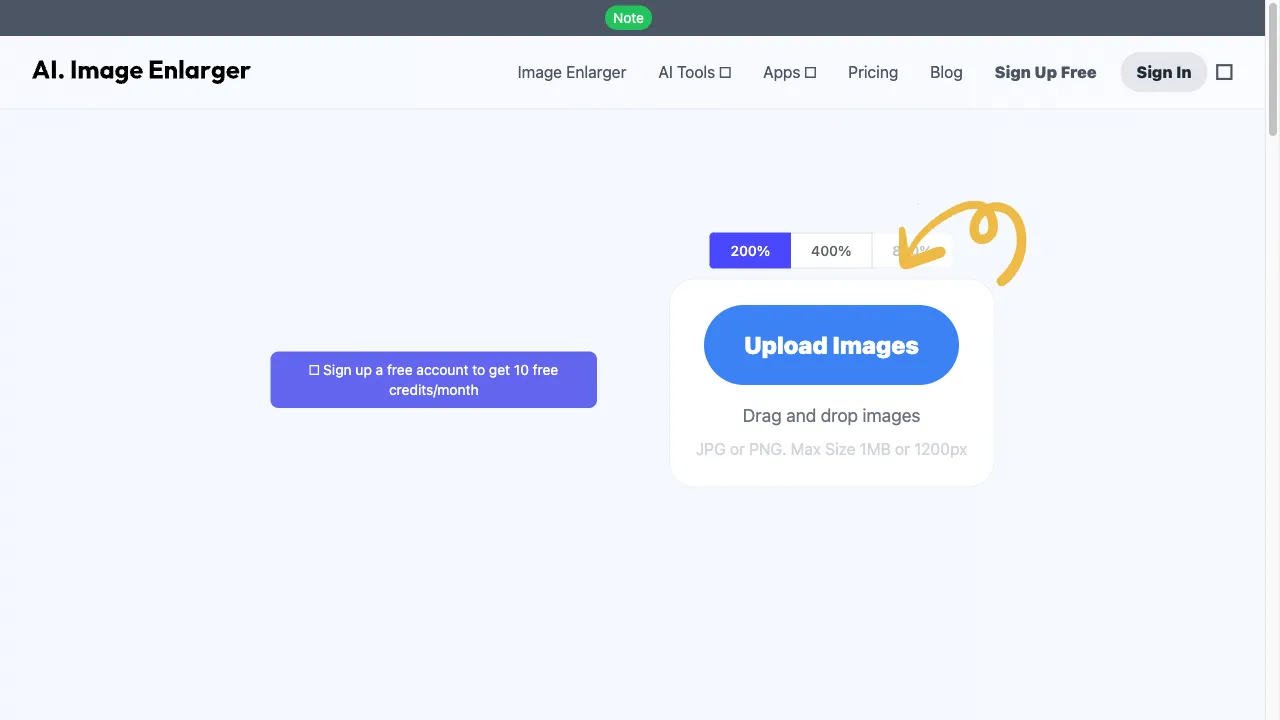
क्या है ImgLarger?
ImgLarger is an AI-based online image enlarger that allows users to upscale images by up to 800% while preserving quality. It is designed for graphic designers, photographers, digital marketers, and e-commerce businesses. ImgLarger uses advanced algorithms to ensure that images retain their clarity and detail even after enlargement. The platform supports various formats like JPG, PNG, and TIFF, and offers features such as batch processing and privacy assurance. Users can try the service for free before opting for a subscription for full features.
ImgLarger ट्रैफिक एनालिटिक्स
ImgLarger मासिक विजिट
ImgLarger शीर्ष विजिट किए गए देश
ImgLarger शीर्ष कीवर्ड्स
ImgLarger वेबसाइट ट्रैफिक स्रोत
ImgLarger विशेषताएँ
Advanced Upscaling Technology
ImgLarger uses sophisticated AI algorithms to analyze and enhance image pixels, allowing users to convert low-resolution photos into high-definition graphics effortlessly.
User-Friendly Interface
The platform is designed for ease of use, enabling users to upload images and receive enhanced versions quickly.
Multi-Format Support
ImgLarger supports various image formats, including JPG, PNG, and TIFF, making it versatile for different applications.
Batch Processing
Users can upscale multiple images simultaneously, saving time and effort.
Privacy Assurance
All uploaded images are automatically deleted after processing, ensuring user privacy.
Free and Paid Plans
ImgLarger operates on a freemium model, allowing users to try the service with limited features before committing to a subscription.
ImgLarger फायदे
High-Quality Results
ImgLarger is praised for its ability to produce high-quality images that retain detail and clarity.
Time Efficiency
The platform significantly reduces the time and effort required for manual image enhancement, allowing users to focus on other tasks.
User-Friendly
The intuitive interface makes it accessible for users with varying levels of technical expertise.
Privacy Protection
Automatic deletion of images after processing enhances user privacy.
ImgLarger नुकसान
Inconsistent Results
Some users have reported that the quality of enlarged images can vary, particularly with human faces.
Freemium Limitations
The free version has limitations on the number of images that can be processed, which may not meet the needs of all users.
Technical Issues
Users have experienced errors and crashes, requiring them to log out and log back in.
उपयोग कैसे करें ImgLarger
Step 1: Visit the Website
Go to imglarger.com to access the ImgLarger platform.
Step 2: Upload Your Image
Click on the upload button to select the image you want to enlarge from your device.
Step 3: Select Enlargement Factor
Choose the desired enlargement factor (2x, 4x, or 8x) based on your needs.
Step 4: Submit for Processing
Click the enlarge button, and the AI will process the image.
Step 5: Download the Enhanced Image
Once processing is complete, download the enlarged image to your device.
कौन उपयोग कर रहा है ImgLarger
Digital Marketing
Enhancing product images for e-commerce websites to attract customers.
Photography
Upscaling personal or professional photos for printing or online sharing.
Graphic Design
Improving the quality of images used in presentations, websites, and social media.
Content Creation
Bloggers and content creators can enhance visuals to improve engagement and aesthetics.
टिप्पणियाँ
"ImgLarger has truly changed the way I handle images for my blog. The results are impressive!"
"I was skeptical at first, but after trying ImgLarger, I am a fan! It works wonders on my product photos."
"The interface is so easy to use, I had my images enhanced in no time!"
"I had some issues with processing times, but the quality of the images was worth it."
"ImgLarger saved me hours of work! Highly recommend for anyone needing quick image enhancements."
संदर्भ
ImgLarger विकल्प

AI-powered photo editing tool for enhancing and colorizing images.

AI आधारित इमेज अपस्केलिंग और एन्हांसमेंट टूल

AI-powered tool for removing unwanted media elements.

एक AI-आधारित ऑनलाइन इमेज सुधार उपकरण।

Transform 2D images into 3D experiences effortlessly.

AI-powered image upscaling tool for high-quality visuals.

एक AI प्लेटफार्म जो चित्र निर्माण और मॉडल होस्टिंग के लिए है।

An AI tool for image processing and customization.

AI-चालित चित्र निर्माण के लिए एक अभिनव मंच।

AI-powered platform for creating marketing videos.

AI-driven video enhancement tool for creators.

एक नवोन्मेषी AI उपकरण छवि निर्माण के लिए।

AI-powered image enhancement tool for businesses.

AI-powered photo editing platform for product images.

कटिंग-एज AI सॉफ्टवेयर इमेज एन्हांसमेंट के लिए।

एक उपयोगकर्ता के अनुकूल वीडियो संपादन सॉफ़्टवेयर सभी कौशल स्तरों के लिए।