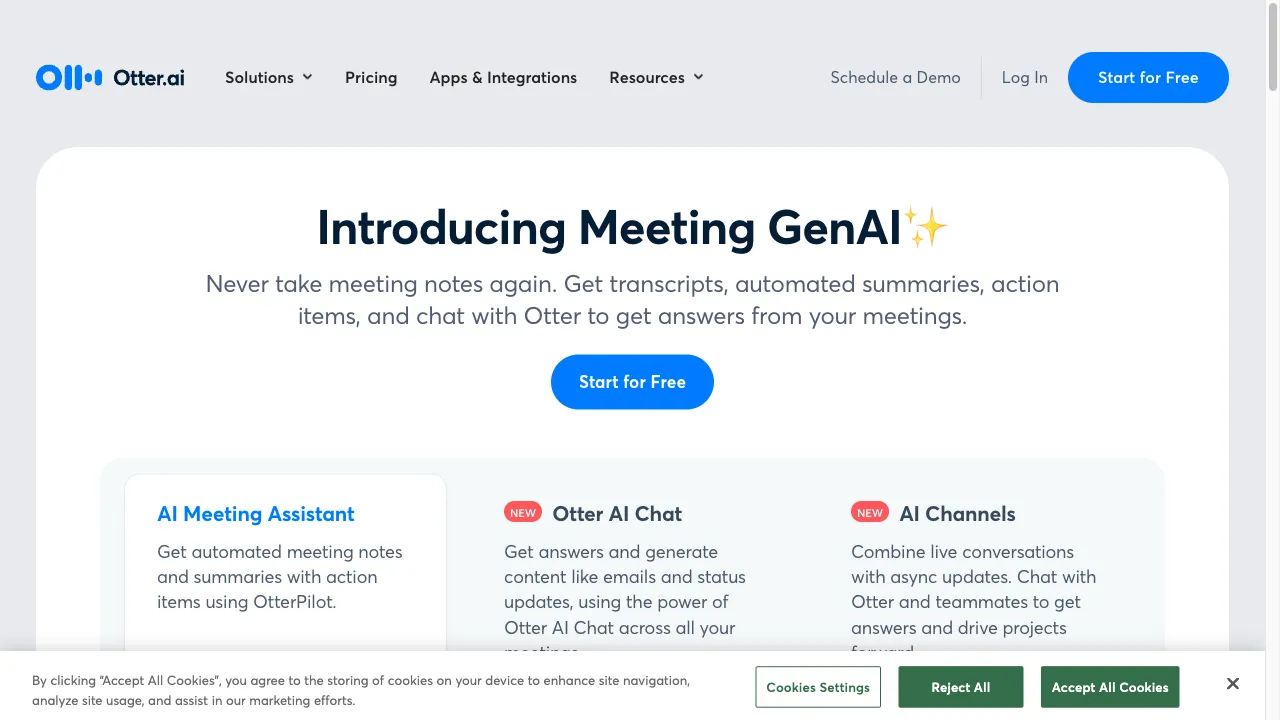
क्या है Otter.ai?
Otter.ai is an advanced AI-powered transcription service that enhances productivity by converting spoken language into written text. It uses machine learning and natural language processing to provide accurate transcriptions for meetings, lectures, and interviews. Accessible via web and mobile apps, it integrates with tools like Zoom and Google Meet, making it ideal for professionals and teams.
Otter.ai ट्रैफिक एनालिटिक्स
Otter.ai मासिक विजिट
Otter.ai शीर्ष विजिट किए गए देश
Otter.ai शीर्ष कीवर्ड्स
Otter.ai वेबसाइट ट्रैफिक स्रोत
Otter.ai विशेषताएँ
Real-Time Transcription
Otter provides live transcription of conversations, allowing users to capture notes as discussions unfold. This feature is particularly useful during meetings and lectures.
Speaker Identification
The service can differentiate between speakers, attributing text to the correct individual, which enhances clarity in multi-participant settings.
Integration with Calendar and Collaboration Tools
Otter can connect with Google Calendar and Microsoft Outlook, automatically joining scheduled meetings and recording them. It also integrates with platforms like Zoom and Microsoft Teams.
Audio and Video File Support
Users can upload pre-recorded audio and video files for transcription, supporting various formats such as MP3, WAV, and MP4.
OtterPilot
This feature allows Otter to automatically join meetings and transcribe them in real-time, generating summaries and action items post-meeting.
Custom Vocabulary
Users can build a custom vocabulary to improve transcription accuracy, particularly for industry-specific terminology.
Otter.ai फायदे
High Accuracy
Otter.ai has made significant improvements in its transcription accuracy over the years, making it a reliable tool for capturing spoken content.
User-Friendly Interface
The platform is designed to be intuitive, making it accessible for users of all technical skill levels.
Time-Saving
Automating the transcription process saves users considerable time compared to manual note-taking.
Collaboration Features
The ability to share transcripts and collaborate in real-time enhances team productivity.
Otter.ai नुकसान
Limited Language Support
Currently, Otter.ai primarily supports English, which may limit its usability for non-English speakers.
Occasional Inaccuracies
While generally accurate, users have reported instances of errors in transcription, particularly in noisy environments or with heavy accents.
Customer Service Issues
Some users have expressed dissatisfaction with the customer support experience, citing slow response times.
Pricing Changes
Users have noted that the pricing structure has changed over time, with some features becoming less accessible in lower-tier plans.
उपयोग कैसे करें Otter.ai
Step 1: Sign Up
Users can create an account for free or choose from various paid plans that offer additional features.
Step 2: Download the App
The mobile app is available on both Android and iOS platforms, allowing users to access Otter's functionalities on the go.
Step 3: Connect Calendars
Integrate with Google or Microsoft calendars to automate meeting recordings.
Step 4: Record or Upload
Users can start a live recording or upload existing audio/video files for transcription.
Step 5: Review and Edit
After transcription, users can review the text, make edits, and share the notes with others.
कौन उपयोग कर रहा है Otter.ai
Business Meetings
Capture detailed notes and action items during team meetings, ensuring that all participants have access to accurate records.
Lectures and Educational Settings
Students can record and transcribe lectures, making it easier to review material later.
Interviews
Journalists and researchers can transcribe interviews for accurate reporting and analysis.
Podcasts and Content Creation
Creators can transcribe audio content for accessibility and SEO purposes.
Brainstorming Sessions
Teams can document ideas and discussions in real-time, fostering collaboration and innovation.
टिप्पणियाँ
"Otter.ai has completely transformed the way I take notes during meetings. It's incredibly accurate and saves me so much time!"
"I love how easy it is to use Otter.ai. The integration with Zoom is seamless, and I can focus on the discussion without worrying about taking notes."
"The speaker identification feature is a game-changer for group discussions. It makes it so much easier to follow who said what!"
"While I appreciate the features, I have faced some issues with customer support. Response times could definitely be improved."
"Overall, Otter.ai is a fantastic tool for anyone looking to enhance their productivity. Just be aware of the occasional inaccuracies."
संदर्भ
- [1] CNET की Otter.ai की समीक्षा.URL:https://www.cnet.com/tech/services-and-software/otter-ai-review/on: 4/1/2024
- [4] Reddit पर Otter.ai पर चर्चा.URL:https://www.reddit.com/r/ProductManagement/comments/1866ags/is_otterai_worth_it_for_meeting_minutes/
- [5] TrustRadius पर Otter.ai की समीक्षाएँ.URL:https://www.trustradius.com/products/otter-ai/reviews?qs=pros-and-cons
- [7] No Jitter पर OtterPilot की विशेषताएँ.URL:https://www.nojitter.com/ai-speech-technologies/what-are-otterpilot-otter-ai-key-features-benefits
Otter.ai विकल्प
AI-निर्मित पात्रों के साथ रचनात्मक बातचीत करें।

Advanced AI-driven transcription service for audio and video.
AI-निर्मित पात्रों के साथ बातचीत करें।
एआई द्वारा संचालित वीडियो निर्माण प्लेटफ़ॉर्म

ऑटोमेटेड ट्रांसक्रिप्शन और सबटाइटलिंग टूल

एक अभिनव प्लेटफ़ॉर्म वयस्क AI चैटबॉट के लिए।

Engage in lifelike conversations with AI characters.

एक वेब-आधारित प्लेटफ़ॉर्म जो AI का उपयोग करता है।

AI-powered transcription service for audio and video.

Transform written text into realistic spoken audio.

एक उन्नत AI-चालित ट्रांसक्रिप्शन सेवा पेशेवरों के लिए।

AI में प्रॉम्प्ट इंजीनियरिंग के लिए एक व्यापक संसाधन।

नोवा एआई चैटबोट एक व्यक्तिगत एआई सहायक है।

एक AI-संचालित उपकरण जो कुशल ऑडियो संपादन के लिए है।

A data-centric AI platform for computer vision tasks.

व्यक्तिगत एआई साथी बनाने के लिए एक अभिनव प्लेटफॉर्म।